
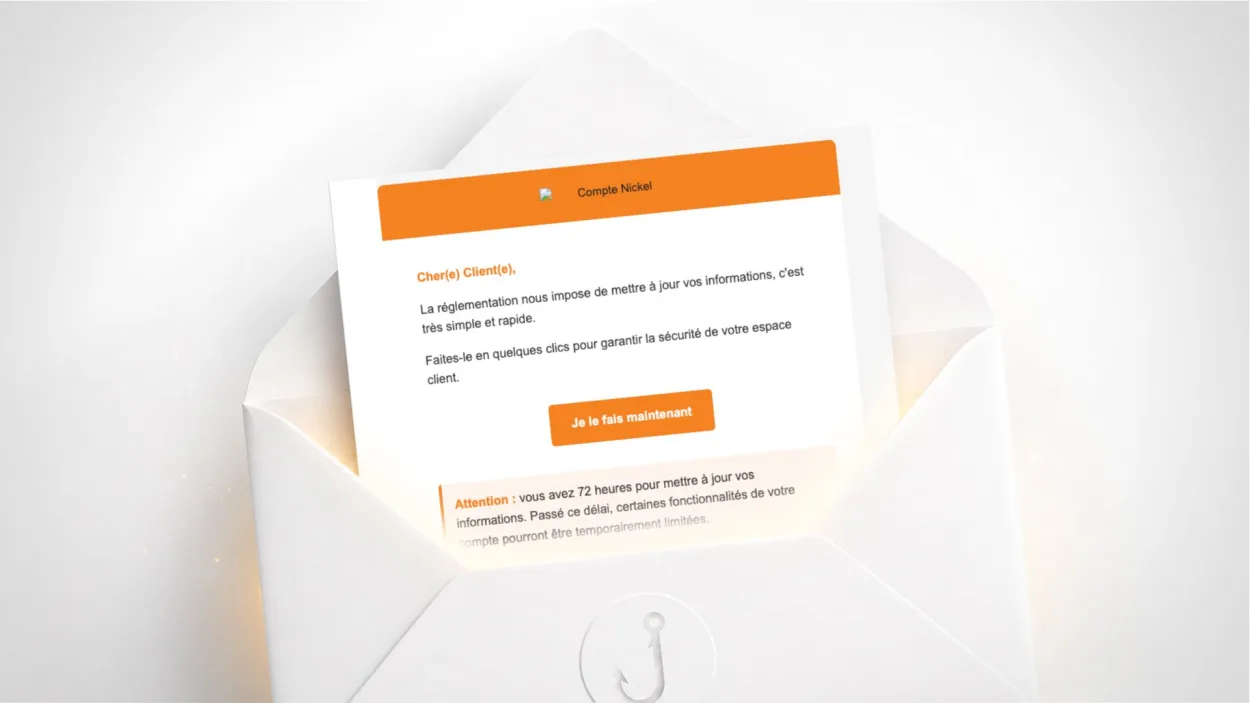
Have you received an email signed “L’équipe Compte-Nickel” asking you to update your information within 72 hours, or risk having some of your account features restricted? It is a scam. The email has nothing to do with Nickel, the French neobank. Here is how to check and what to do.
Is this Nickel email a scam?
Yes. The sender is support@lot.ziy.cc, a .cc (Cocos Islands) domain with no connection to Nickel. Nickel’s real sending address uses @compte-nickel.fr. The sending IP is located in Shanghai and was already on Spamhaus spam blocklists when the email was sent. Gmail detected it too and displays a red warning banner as soon as the email is opened.
The “Je le fais maintenant” (“Do it now”) button pointed to a compromised Dutch website (bjorntimmermans.nl/nickel.php), which has since been taken down. The malicious script has been removed or the site cleaned, but the campaign can resume with a new domain at any time.
Why is Nickel a frequent phishing target?
Nickel is a neobank open to everyone with no income requirement, popular with a broad audience that includes people less familiar with online scams. That is precisely why it is targeted: scammers look for the audiences most likely to respond to an urgent instruction without checking the sender.
The mechanism is classic: a vague regulatory pretext (“regulations require us to update your information”), a short deadline (72 hours) and a threatening consequence (restricted features). None of these elements can be verified, but together they create enough pressure to make people click without thinking.
What signs give this email away?
Several clues let you identify the scam without technical analysis.
The sender address. support@lot.ziy.cc has nothing to do with Nickel. Clicking the sender name in your email client shows the full address. Nickel only communicates from @compte-nickel.fr.
The logo loaded from Yahoo Images. The Nickel logo shown in the email is hosted on Yahoo’s image servers, not on Nickel’s. It is a technical detail invisible to most users, but a telling one: an official email loads its visuals from its own servers.
No personalisation. The email is addressed to “Dear Customer” with no first name or account number. Nickel knows your first name and uses it in its communications.
A regulatory pretext with no details. “Regulations require us to” without saying which regulations, or which information is concerned. A real regulatory update email cites the reference text and lists the fields to complete.
How to check whether your Nickel account really requires action
Open the Nickel app on your phone or log in on compte-nickel.fr by typing the address yourself. If an update to your information really is required, a notification appears directly in your customer area. Nickel does not make access to your account conditional on an action triggered from an unsolicited email.
If in doubt, contact Nickel customer service through the app or on the official number listed on compte-nickel.fr, never through a number or link found in a suspicious email.
What to do if you clicked and entered your information
If you clicked “Do it now” but did not enter anything, the risk is limited. The destination site now shows a 404 error, meaning the malicious page is no longer active.
If you entered your Nickel credentials on the page, act immediately: log in on compte-nickel.fr and change your password. Contact Nickel customer service to report the compromise and check whether any suspicious transactions have been initiated. See our guide on what to do if your account has been compromised for the full steps.
Enable two-factor authentication on your account if the option is available: even with your password, an attacker will not be able to access your account without the second factor.
Report the email on Signal Spam and on Cybermalveillance.gouv.fr if you have suffered a loss.
How to protect yourself from this type of scam for good
The most effective rule is never to act from an unsolicited banking email, however urgent it claims to be. Banks, neobanks and financial services communicate real urgent requests through their app or customer area, not through emails with countdowns.
Getting into the habit of checking the sender’s full address before any click is enough to foil the vast majority of scams of this kind. To go further, see our digital hygiene recommendations and our tips to protect your email address. Banking phishing campaigns hit every bank: Nickel, CIC, Société Générale, and the mechanisms are always the same.
Frequently asked questions
Check the sender’s full address: Nickel only sends its emails from @compte-nickel.fr. An email from a .cc, .xyz or any other unknown domain is fraudulent. Log in directly on the Nickel app or on compte-nickel.fr to check whether any action is really required.
No. Nickel does not block access to your account because you did not reply to an unsolicited email. If a regulatory update is required, it appears in your customer area or app, with a reasonable deadline and precise information about what is being requested.
If you did not enter anything on the page, no. A 404 error means the malicious page is no longer active. However, if you entered credentials before reaching the error page, change your Nickel password immediately and contact their customer service to report the incident.

Leave a Reply