
Whenever you use your computer, or even your smartphone, it constantly communicates using many protocols, including ARP. In this article, we take a closer look at how ARP works and at the security flaws that come with it.
This article is for educational purposes only. I am in no way responsible for your actions. Only test on your own network or on a network where you are authorised to do so.
What is ARP (Address Resolution Protocol)?
As its name suggests, ARP (Address Resolution Protocol) resolves MAC (Media Access Control) addresses. Its job is to map an IP address (IPv4) to a physical address, which is essential for machines on a network to communicate with each other. If you followed the advice in the article on securing your SSH server in 12 steps, you used ARP.
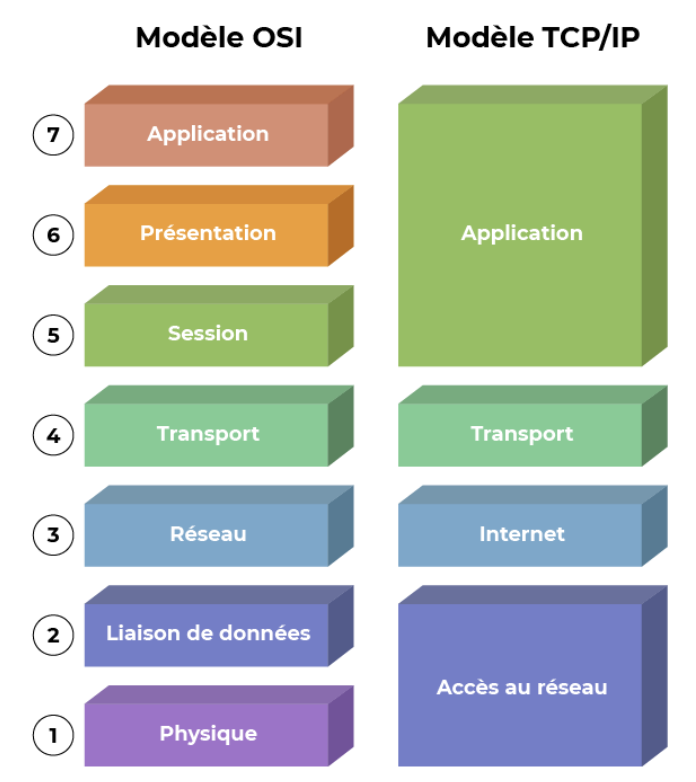
In the OSI (Open Systems Interconnection) model, ARP sits between layer 2, the data link layer (MAC address), and layer 3, the network layer (IPv4 address).
ARP’s technical specifications were defined in RFC 826 back in 1982, yet the protocol is still in use today.
ARP in more detail
When a computer wants to communicate with another, it sends Ethernet frames. For them to reach their destination, it needs to know the destination’s physical (MAC) address.
At this point, the sending computer knows the destination IP address, so it looks in its ARP cache (or table) for the matching MAC address. The cache is simply a text file.
Viewing your ARP cache
On most operating systems, you can run:
➜  ~ arp -a
livebox.home (192.168.1.1) at 98:42:65:14:ac:a0 on en0 ifscope [ethernet]
laptop-jl74fr23.home (192.168.1.18) at 54:13:79:b7:e9:af on en0 ifscope [ethernet]
chromecast.home (192.168.1.21) at 6c:ad:f8:88:45:4c on en0 ifscope [ethernet]
pc-29.home (192.168.1.40) at 46:34:40:52:e0:1c on en0 ifscope [ethernet]
Or:
/ # ip neigh
10.5.0.4 dev eth0 lladdr 02:42:0a:05:00:04 ref 1 used 0/0/0 probes 4 REACHABLE
So if the Ethernet frame I want to send is for my Chromecast at IP address 192.168.1.21, I look in my table and see that the matching MAC address is 6c:ad:f8:88:45:4c.
Three types of ARP exchange
Networks are all about communication: ARP tables don’t fill themselves by magic. If the mapping isn’t in the table, we need a way to find the missing piece.
There are three types of exchange for this:
- Requests (Request – Who has): used when the computer that wants to send a frame doesn’t know the recipient’s MAC address. This is how the cache fills up as communication goes on.
Via ARP, the computer asks: Who has 192.168.1.40? Tell 192.168.1.1. (which MAC address matches IP address X? Reply to myIPAddress)
The request is sent as a broadcast, meaning it goes to the entire network segment (in my case, every device in my home). - Replies (Reply – Is At): the device that owns the IP address answers the question, sending back its IP and MAC addresses so the computer can add them to its ARP cache and send the Ethernet frame.
The reply is unicast, i.e. sent only to the computer that asked: 192.168.1.1 is at 98:42:65:14:ac:a0 (I am IP address X, my MAC address is Y) - Gratuitous ARP: a reply sent without any request. It’s typically used when a device boots up, to announce itself on the network. Unlike a normal reply, it’s sent as a broadcast rather than unicast.
Each of these results in a new cache entry or an update.
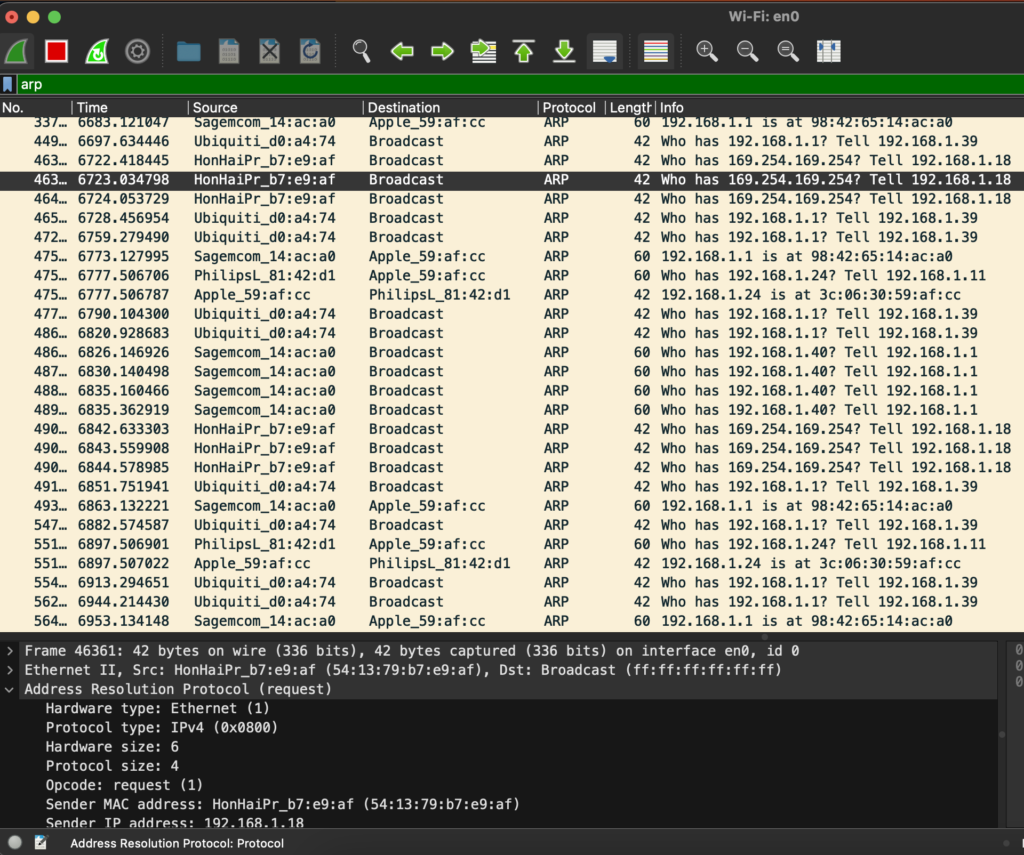
To see the requests leaving and reaching your computer, install Wireshark (also bundled in the Exegol pentest environment) and select the network interface of your choice.
Protocol fields
Looking closely at the fields of these three exchange types, with Wireshark for instance, you’ll see they’re fairly simple.
| Hardware Type | Hardware used to carry the ARP message. |
| Protocol Type | Type of protocol used. |
| Hardware size | Length of the hardware address in bytes: MAC addresses are 6 bytes, or 48 bits. |
| Protocol size | Length of the IPv4 address in bytes. |
| Opcode | Defines the type of message. |
| Sender MAC address | Sender’s MAC address. |
| Sender IP address | Sender’s IP address. |
| Target MAC address | Target’s MAC address (00:00:00:00:00:00 if the opcode is 1, i.e. a request, and ff:ff:ff:ff:ff:ff if the opcode is 2 and it’s a gratuitous ARP). |
| Target IP address | Target’s IP address. |
In a request, the unknown X is the target’s MAC address, which is why it’s set to 00:00:00:00:00.
Opcodes
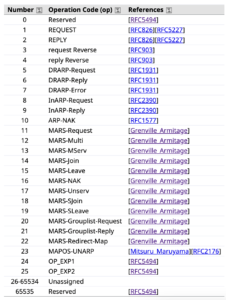
The three reference opcodes are:
| 0 | Reserved | [RFC5494] |
| 1 | REQUEST | [RFC826][RFC5227] |
| 2 | REPLY | [RFC5227] |
There are many others, but they aren’t reference opcodes.
Protocol vulnerabilities
Now that we understand how it works, two main security problems stand out:
- No authentication
- No control over the timing or the request/reply sequence
An attacker can therefore carry out various attacks by forging malicious ARP packets (changing certain fields) to perform a Man-in-the-Middle (MITM) attack.
ARP Cache Poisoning
Cache poisoning is one way to perform a MITM. As its name suggests, the attack poisons the cache of one or more machines.
The attacker sends ARP replies to the victim, spoofing the MAC address of the gateway (or another client). These replies must be sent continuously so the victim’s ARP cache keeps our MAC address mapped to the gateway’s IP address. This puts us in a MITM position, receiving every request the victim sends.
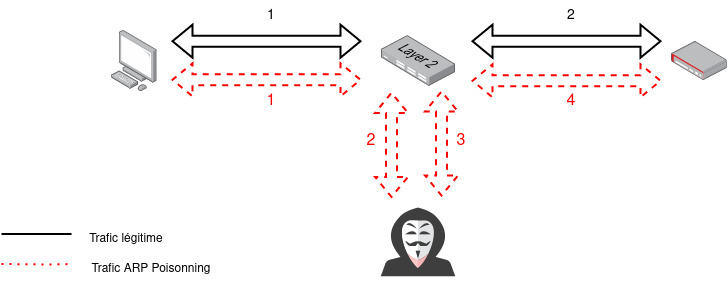
To keep the attack from being noticed, traffic received from the victim must be forwarded to the legitimate gateway so the victim’s requests still get answers.
There are several ways to do this: you can build a packet with Scapy, use a ready-made tool such as Ettercap or even the command-line tool arpspoof.
To intercept traffic between a client and the gateway, simply create two ARP packets with opcode 2 (is-at):
- Poisoning the client: we set the destination IP address “pdst” to the victim’s IP and the destination MAC address “hwdst” to the victim’s MAC address.
- Poisoning the gateway: we also set the source IP address “psrc” to the gateway’s IP and the source MAC address “hwsrc” to our own machine’s MAC address, in order to impersonate the gateway.
Hardening ARP
Simple solutions exist, but they are actually tricky to implement.
First, you can monitor the network with various tools (arpalert, arpwatch, IDS, etc.). You can also define static entries in each machine’s ARP cache, but this quickly becomes impractical on a large fleet. Another option is to limit the number of MAC addresses per switch port.
There’s also a secure version of ARP, S-ARP (IEEE 1254311), which I’ve never had the chance to test.


Leave a Reply