
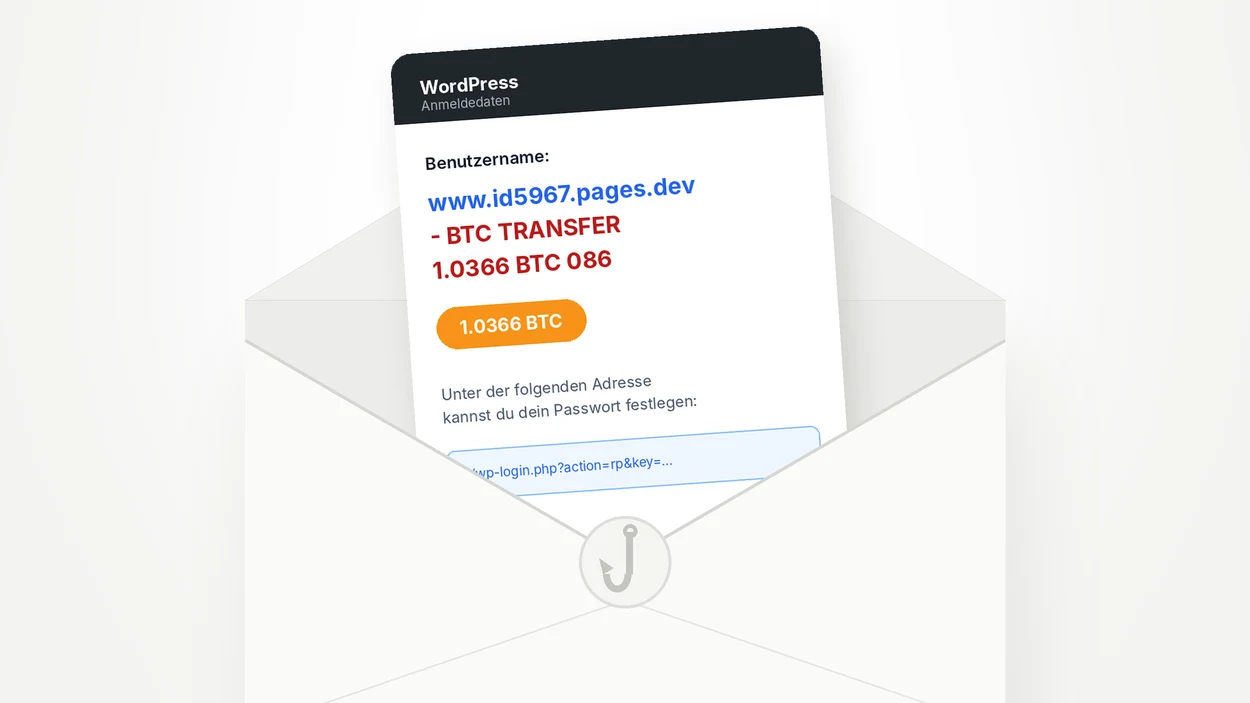
Did you receive an email from “WordPress”, in German, titled “[] Anmeldedaten”, showing a “BTC TRANSFER 1.0366 BTC” where the username should be? It’s a scam, and a subtler one than it looks: the email is genuine, sent by a real WordPress site, but the bait has been slipped into the “username” field of an account registered with your address. Here’s how it works and what to do.
What does this “Anmeldedaten” email say?
The email arrived on a Sunday morning at 8:01 am, straight into the spam folder of one of our Gmail addresses. The subject, “[] Anmeldedaten” (“login details” in German), contains an empty pair of brackets, where WordPress normally puts the site name. The body is only a few lines long: a “username” made of a pages.dev address and the words “BTC TRANSFER 1.0366 BTC 086”, then a link to “set your password”.
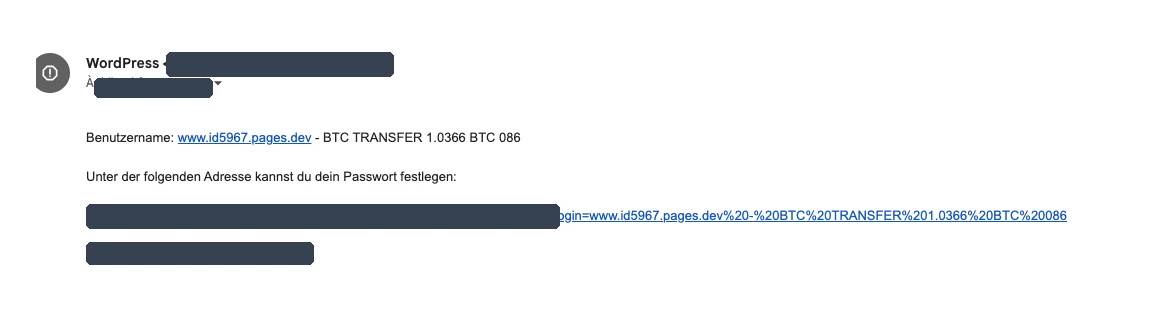
Gmail turns the pages.dev address into a clickable link, which makes the message look like a transfer notification with a link to view it. That’s exactly the intended effect.
A genuine WordPress email, hijacked
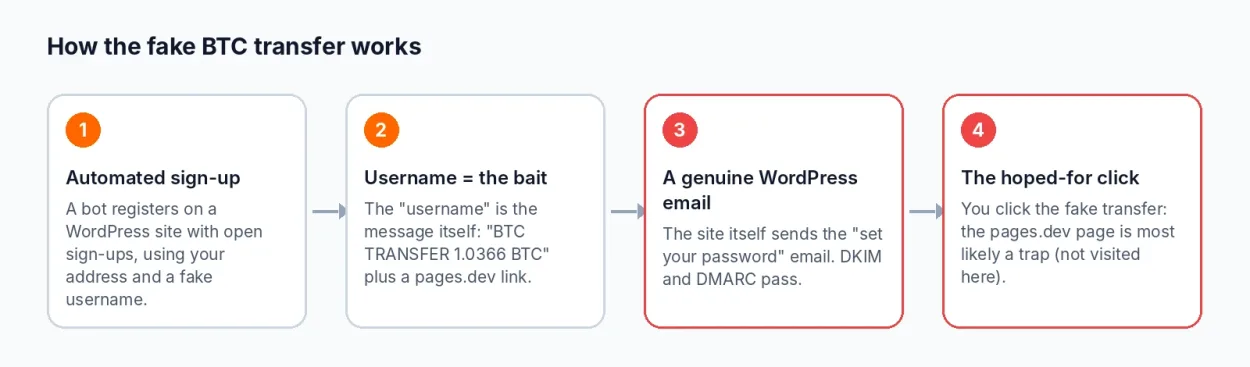
This message follows the template of the email WordPress sends to anyone who has just signed up to a site: “Username: …”, then “To set your password, visit the following address: …”. It hasn’t been forged. It was produced by a WordPress site with open registration (the “Anyone can register” option), where a bot created an account by filling in two fields:
- the email address: yours (here, a variant of our Gmail address with a “+tt58” suffix);
- the username: the scam text, “www.id5967.pages.dev – BTC TRANSFER 1.0366 BTC 086”.
WordPress does the rest on its own: it sends a welcome email to that address, copying the username as is. The site owner most likely has nothing to do with it, and the recipient gets a message from a real sender. We’re not naming the site: it’s most likely a legitimate site whose open registration is being exploited without its owner’s knowledge.
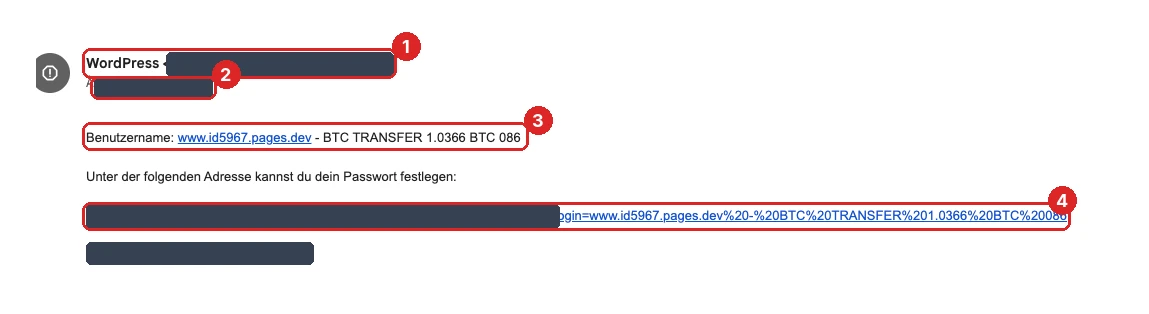
- The sender is a WordPress site unrelated to you. It could be any site with open registration.
- You’re the recipient of a sign-up you never made. Gmail ignores everything after the “+” sign in an address: an attacker who knows your address can make as many variants as they like, all delivered to the same inbox.
- The “username” is the message. A real username is never a web address followed by an amount of bitcoin.
- The “set your password” link is useless to you. It leads to the third-party site’s login page, not to a wallet or a payment service.
Why the username looks like that
The wording of the bait isn’t random. WordPress cleans usernames and only accepts letters, digits, spaces and a few characters such as the dot, the hyphen or the at sign. Colons and slashes are stripped out. So there’s no way to include a full address with “https://”: the scammers write “www.id5967.pages.dev” and count on your email client to turn it into a link. The “- BTC TRANSFER 1.0366 BTC 086” that follows also uses only allowed characters.
Why this email gets past spam filters
The headers explain why this type of message is hard to block. In Gmail, you can view them via the three dots at the top right of the message, then “Show original”.

- DKIM: pass. The message is signed by the WordPress site’s domain, which proves it really was sent by that server and wasn’t altered along the way.
- DMARC: pass. The domain of the displayed sender matches the signature domain. It even applies a “quarantine” policy.
- SPF: no result. The check tells us nothing useful: the technical sending address belongs to the site’s host. It isn’t a failure, unlike what we saw with the spoofed FedEx emails.
- The “X-PHP-Script: …/wp-login.php for 51.158.206.19” line shows which IP address called the site’s login page at the time of the sign-up. It isn’t the mail server’s address: it’s the machine that triggered the request.
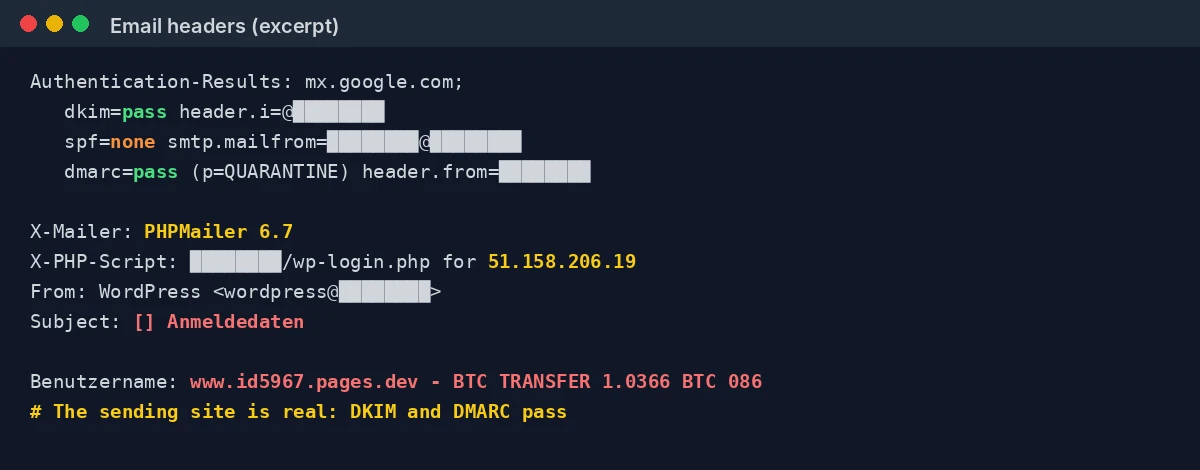
In this case, authentication works against the recipient: everything checks out except the content. Gmail filed the message as spam because it looks like other messages reported before, not because a technical check failed.
What are the scammers after?
We didn’t open the pages.dev address, and we advise you not to: opening a booby-trapped page adds nothing to the analysis. The scenario does match that of fake “crypto received” notifications, though: a page tells you an amount is waiting, then asks you to connect your wallet or enter your recovery phrase to “claim” it. These pages are often hosted on free platforms like pages.dev, Cloudflare’s static-site hosting service. This is an inference from the email’s pattern: we haven’t verified it on the site.
What matters is the mechanism. The message promises money (more than one bitcoin), has nothing to do with anything you requested, and demands quick action. It’s all written in German, with no connection to you.
What to do if you receive this email
- Don’t click any link, neither the pages.dev address nor the password link.
- Don’t reply and don’t forward the message to your contacts.
- Report it as spam in your email client, and to your national anti-spam service if there is one.
- There’s no need to change your passwords: none of your accounts is affected. An account was created on a third-party site with your address, nothing more.
If you already clicked, close the page without entering anything. If you connected a wallet or entered a recovery phrase, move your funds to a new wallet created with a new phrase straight away, then report the page to Cloudflare, which hosts pages.dev.
Site owners: how to stop your site sending this kind of email
If you run a WordPress site, you may be relaying these scams without knowing it. Every email sent this way leaves your server and damages your domain’s reputation with Gmail and other mail providers. To prevent it:
- Turn registration off if you don’t need it: Settings, General, then untick “Anyone can register”. It’s the most effective measure.
- Add a captcha or bot protection (Cloudflare Turnstile, hCaptcha) to the registration form.
- Limit attempts per IP address, with a web application firewall or through your host.
- Review your user list and delete accounts with odd names: they’re a sign your registrations are being exploited.
The host Greenhost described this mechanism back in 2018: automated sign-ups that make thousands of websites send a confirmation email to a single mailbox, with WordPress’s registration option being the most abused. FatLab, for its part, details protections against fake WordPress registrations.
A scam that hijacks a legitimate service
This scam follows the same logic as others documented on safecode.fr, such as the fake €195 tax refund or the fake cloud storage warning: a promise of money or a threat, a well-known brand, and an action to take without thinking. What’s new is the sender, who is real. Remember one simple rule: a signed, authenticated email sent from a real website isn’t necessarily an honest one. For good everyday habits, see our guide on how to tell if your computer has been hacked.
WordPress “BTC TRANSFER” email: frequently asked questions
A bot created an account on that site, which has open registration, using your address. WordPress then automatically sent you the welcome email. None of your accounts has been hacked.
No. It’s text slipped into the account’s “username” field. No bitcoin is waiting for you, and the pages.dev address isn’t a payment service.
No. The DKIM and DMARC checks only prove that the site did send the message, not that its content is honest. Here, the site is being used without its owner’s knowledge.
Close the page without entering anything. If you connected a wallet or entered a recovery phrase, move your funds to a new wallet right away and report the page to Cloudflare.
Turn off the “Anyone can register” option if you don’t need it; otherwise add a captcha, limit attempts per IP address and delete suspicious accounts.

Leave a Reply