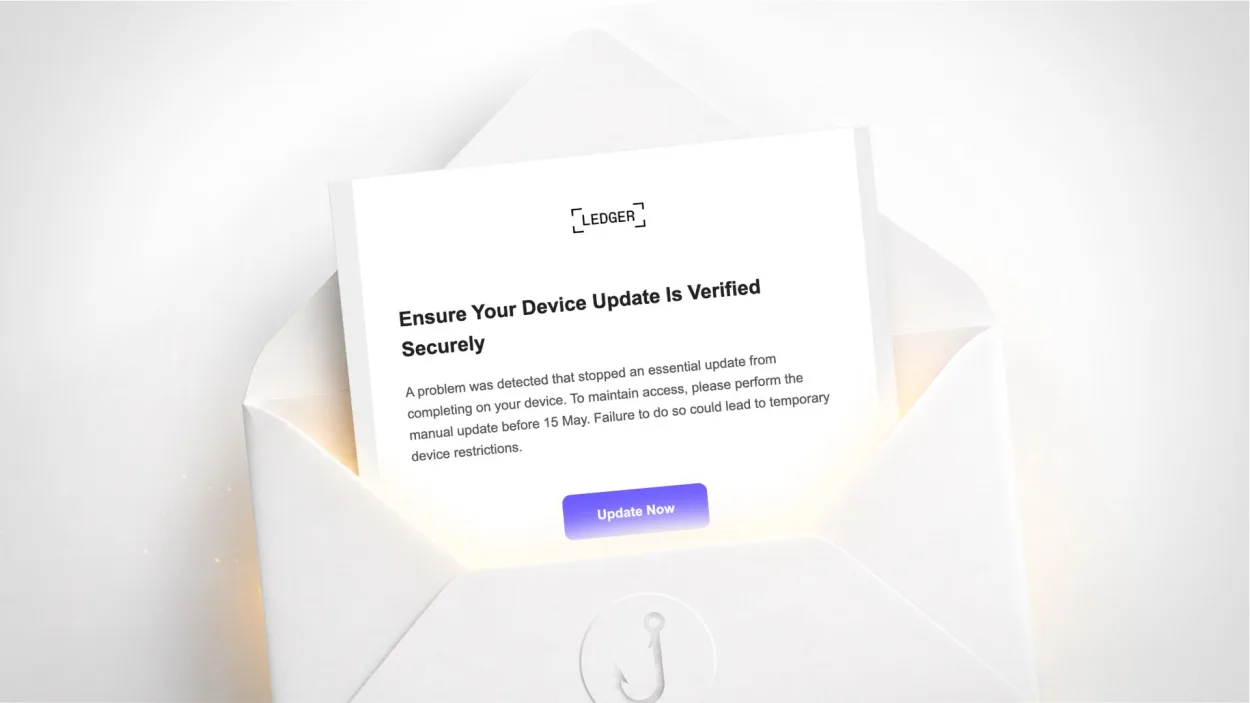
Have you received an email signed “Ledger” titled “Update Required: Security Enhancement for Firmware”, asking you to update your device before 15 May or face restrictions? It is a scam. It aims to steal your crypto wallet’s recovery phrase, which would give the scammers full, irreversible access to your funds. Here is how to recognise it.
Yes. This email has nothing to do with Ledger, the French maker of hardware wallets for cryptocurrencies. The real sender is an address on bkizhfrxso.pyrt.pt, a random subdomain on a Portuguese domain unrelated to Ledger. The “Update Now” button points to www-ledgermpginfribaloa.pyrt.pt, a deceptive-looking domain designed to resemble an official Ledger address.
Ledger only communicates from the ledger.com domain. Any other address is fraudulent.
Why is this email particularly dangerous?
The goal of this scam is not to steal a password or a card number, but the recovery phrase (seed phrase) of your Ledger wallet: the sequence of 24 words that lets you restore access to your crypto assets.
This phrase is the ultimate key to your wallet. Anyone who has it can transfer all your funds to their own addresses, with no way to cancel or get a refund. Unlike bank fraud, a cryptocurrency transaction is irreversible: no bank and no authority can undo it.
That is precisely why hardware wallet owners are so heavily targeted: a single successful seed phrase theft can be worth a great deal to the attacker.
What techniques does this email use to fool filters?
This email is technically sophisticated and uses several tricks to get around protections.
The sender name in special Unicode characters. The word “Ledger” shown as the sender is not written in normal letters, but in Unicode mathematical characters (an alternative alphabet that looks like Latin letters). This technique aims to fool spam filters that detect the word “Ledger” in standard text. The security filter nonetheless spotted the anomaly and flagged it.
Routing through Microsoft servers. The email was routed through Microsoft’s Outlook infrastructure, which helps it pass some recipient-side checks. But Microsoft itself flagged the email as suspicious in its own headers: SPF fails, DMARC fails, and the real origin is identified as Ukraine, with a non-existent sending domain.
The logo loaded from a third-party site. The Ledger logo displayed in the email comes from a site called crypto-central.io, not from Ledger’s servers. An official email loads its visuals from its own domain.
How to recognise this scam without technical analysis
Several signs are visible to any user.
The sender address. When you display the full address, the domain is not ledger.com. This is the most reliable sign.
Urgency and threats. “Update before 15 May or face restrictions” is artificial pressure. Ledger never threatens to restrict your device, which works offline and does not need any urgent action triggered by email.
The internal contradiction. The email’s own footer displays the warning: “Ledger will never ask for your recovery phrase or your confidential keys.” Yet that is exactly what the landing page tries to obtain. The scammers copy official security notices without grasping the irony.
The golden rule of crypto. No legitimate firmware update is done through a link received by email. Ledger updates only go through the official Ledger Live app, downloaded from ledger.com.
How to update your Ledger safely
Firmware updates for a Ledger wallet are done exclusively through the Ledger Live app, on desktop or mobile. Open Ledger Live, connect your device, and the app itself will tell you if an update is available. At no point does this process ask for your recovery phrase.
If you don’t have Ledger Live yet, download it only from the official ledger.com site, never through a link received by email. Never enter your 24 words on any website: the recovery phrase is only ever entered on the physical Ledger device itself, never on a computer or phone screen.
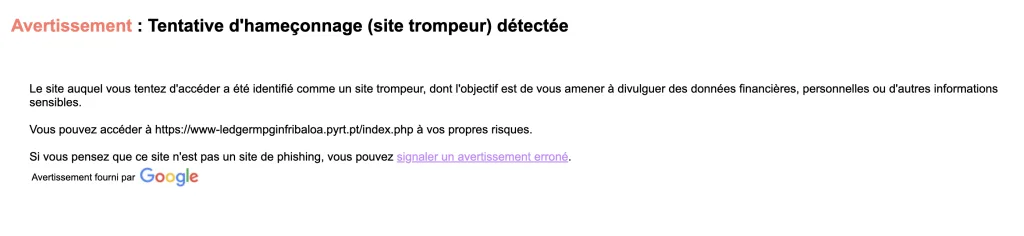
Note: if you clicked the link, your browser may have shown a red “Deceptive site ahead” phishing warning provided by Google. It is an effective protection: never click “continue at your own risk”. Simply close the tab. This warning confirms that the site is fraudulent.
What to do if you entered your recovery phrase
If you gave your 24 words on the fraudulent site, consider your funds under immediate threat. Act without delay.
Move all your crypto assets as quickly as possible to a new wallet whose recovery phrase has never been exposed. If you have another Ledger device or a secure wallet, initialise a new one with a new phrase and move your funds. Speed is critical: attackers often automate the draining of compromised wallets within minutes.
Report the incident on Cybermalveillance.gouv.fr (France) and file a complaint, even though the chances of recovering crypto are low. To strengthen your overall protection against this type of campaign, see our digital hygiene rules and our guide to protecting your personal data.
Why are crypto holders prime targets?
Cryptocurrencies offer ideal conditions for scammers: potentially large amounts, irreversible transactions and no central authority able to cancel a fraudulent transfer. Once the funds are gone, they are very hard to trace and almost impossible to recover.
Ledger is also a recurring target because the brand suffered a data breach in 2020 that exposed the contact details of hundreds of thousands of customers. These databases are still circulating and let attackers specifically target people known to own a hardware wallet. It is the same logic of exploiting stolen data as in the other campaigns documented on safecode.fr, such as the fake Prime Video renewal that displays victims’ real IBAN, or the fake bank alerts in the name of Société Générale.
Ledger “Security Enhancement for Firmware” email FAQ
How can I tell if a Ledger email is genuine?
Check the sender’s full address: Ledger only communicates from the ledger.com domain. An email asking for an urgent update through a link is fraudulent: real Ledger updates go exclusively through the Ledger Live app. Ledger never asks for your recovery phrase.
Do I need to enter my recovery phrase to update a Ledger?
Never. The 24-word recovery phrase is only entered on the physical Ledger device itself, when restoring it. No firmware update, website or app should ever ask you for these 24 words on a computer or phone screen. Any such request is a scam.
I entered my 24 words on a fake site: what should I do?
Immediately move all your crypto assets to a new wallet whose phrase has never been exposed. Speed is essential because attackers often drain compromised wallets within minutes. Report the incident on Cybermalveillance.gouv.fr and file a complaint, although recovering crypto funds is rarely possible.



Leave a Reply