
You may have heard of two-factor authentication, and you’ve probably already used it to pay online or simply to access your bank account.
It used to be a nice extra layer of security for your accounts, but it’s now an essential measure to use alongside a password manager.
Unfortunately, apart from a few organisations such as banks that enforce it, many sites offer this feature (or don’t…) without most users ever turning it on.
What is two-factor authentication?
First, let’s clear up some terms: two-factor authentication, two-step verification and dual-factor authentication all mean the same thing.
In the rest of this article, we’ll mostly use the abbreviation 2FA.
The idea is to make sure, when someone logs in to a service, that they really are the account owner, using two different proofs, ideally from two different channels.
Example: you log in on your computer and receive a code by SMS. You therefore have to prove that you know the account’s password and that you have the phone (and the passcode needed to read the code on it).
Knowing the password alone is no longer enough. An attacker who steals your password won’t get very far, which matters when you know how many passwords are weak (46% of business passwords are vulnerable).
Different forms of two-factor authentication
There are many forms of 2FA. The main ones are:
- SMS: the service sends a code to the phone number you provided when creating your account. Only the account owner is supposed to have that phone. Of course, you should lock your phone with a passcode and turn off message previews (so the code doesn’t appear on the lock screen).
- Email: works like SMS, but through your mailbox. The code is sent in the body of the email.
- Temporary code generator: your account is linked to an app that generates codes (often on your phone again). The best known is Google Authenticator (for Android and iOS). These are also called OTPs (One-Time Passwords).
- U2F key (Universal 2nd Factor): a USB key that supports the U2F authentication standard (such as Yubico‘s YubiKeys). To log in, you must have this physical USB key.
- App: some services, such as Google with “Google prompts“, offer a less standard form of 2FA.
Benefits of two-factor authentication
Two-factor authentication has one major benefit: it raises your account’s security level, drastically limiting what an attacker can do.
Drawbacks of two-factor authentication
Depending on how it’s used, 2FA has a few drawbacks:
- Slightly slower logins. It depends on the form of 2FA, but expect an extra 3 to 10 seconds when receiving a code by phone or email, the time it takes to open the message and copy it.
- Logging in may be impossible with some methods if you have no internet access (e.g. email) or no mobile signal (e.g. SMS codes).
Note: this isn’t really a drawback, since many sites let you enable several methods, as I explain in detail below.
For developers implementing this feature:
- A potential increase in security flaws. Implementing new features often creates new attack surfaces. It’s rare in practice, but worth keeping in mind (attacks on 2FA will become less and less rare).
Of course, the security gain far outweighs the few extra seconds it takes to log in.
Enable several 2FA methods
Of the two drawbacks for users, being unable to log in becomes very unlikely if you enable several methods.
Here’s my Google account, for example:
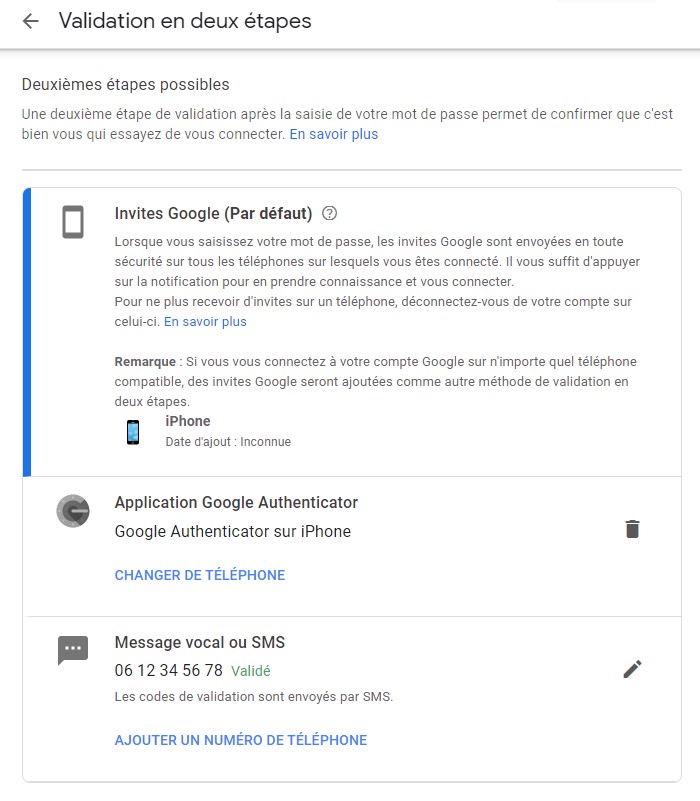
As you can see, I have three methods available:
- Google prompts (available when your Google account is signed in to Gmail on your phone): a full-screen prompt asks whether you’re trying to sign in, with the choice yes or no. It’s the default method because it’s extremely convenient and intuitive, adding just 3 or 4 seconds to the login.
- Google Authenticator: generates OTPs.
- SMS: sends a code.
So if I’m somewhere with internet access but no mobile signal, I can choose between Google Authenticator and the Google prompt.
What if I lose access to my second factor?
A very good question, since you might lose your phone, for example…
First, if the service allows it, enable several methods. If you lose access to your phone, you can fall back on email by logging in to your mailbox from a computer or someone else’s phone.
Next, with apps such as Google Authenticator, you can sync the same OTPs on two different devices. I keep my everyday phone in sync with an old phone that stays in my office. If I ever lose my main phone, the other one lets me keep accessing my services.
Otherwise, as a last resort, you can use your backup codes. When you enable 2FA, the service offers backup codes in case you lose your second factor. Keep them very safe: anyone who steals them can easily get into your account. My advice is to store them encrypted (in your password manager, for example). Once you’ve saved them, you won’t be able to retrieve them again from the service.
The duty of websites and online services
Websites and services aren’t off the hook. You can’t force two-factor authentication when only one method is available and it doesn’t suit the user. It’s therefore up to websites to offer several ways to use 2FA, as described above.
Then no user will have an excuse, because there will be a range of ways to prove their identity.
Two-factor authentication: conclusion
Two-factor authentication is increasingly available on the services we use every day. Yet between low adoption, misconceptions about the hassle and underestimating attackers when facing a single-factor account, many people don’t take the time to set it up on their accounts, and pay the price.
Once optional, this feature is now a must. My advice to users: take the time to enable it, at the very least, on your bank accounts, your email and every service that matters to you.
My request to developers: implement it wherever you can and offer this protection to your users.
If we all do this, we’ll be in a much better position to fight malicious attacks.

Leave a Reply