
Whether you’re an occasional computer and internet user or a seasoned geek, you should be using a password manager. Here’s why.
Password managers: definition and role
A password manager is a piece of software, or a SaaS (Software as a Service) offering in the form of an online service. It’s a virtual vault that stores your passwords securely, using encryption for example.
These tools can store your passwords, but also much more: bank cards, ID cards, or free-text notes for any information that doesn’t fit the other categories.
Your virtual vault is protected by a “master” password. It’s the only one you’ll need to remember from then on, and it must follow a few rules.
Why use a password manager
If you remember only one benefit, make it this: generating complex, unique passwords. A few password statistics speak for themselves:
In 2023, NordPass revealed that the most common password was still “123456”, exposing millions of users to hacking.
A 2022 Verizon study found that 82% of data breaches involve a human element, including errors, stolen credentials, misuse of access privileges and social engineering. Earlier reports, including the 2017 edition, stated that 81% of hacking-related breaches leveraged stolen and/or weak passwords. More recently, a 2025 report found that 46% of business passwords are vulnerable.
There are many benefits, so I’ll just list the main ones:
- Generating very complex passwords when you sign up or create an account.
- Remembering all your passwords, which are now all different and therefore impossible to memorise yourself.
- Storing these passwords encrypted, so they’re no longer left in plain sight. The algorithms used are up to date.
- Thwarting keylogger attacks, since you no longer type your password: the manager fills it in for you.
- Thwarting phishing attempts, since the manager compares the saved URL with the current one.
- Thanks to all of the above, a password manager helps you follow the recommendations of the CNIL (the French data protection authority).
- Access from anywhere: some managers sync your passwords across all your devices.
It’s hard to put an exact figure on how much a password manager reduces risk.
As for user perception, Bitwarden reported that 62% of respondents believe their company adopting passkeys would increase their confidence in its security resilience.
Drawbacks of password managers
To give a balanced view, here are a few drawbacks:
- It’s hard to add all your accounts quickly (it takes several hours to add your existing accounts, and even after four years I still occasionally add one I’d forgotten). The only solution I’ve found is to adopt a password manager as early as possible.
- Many handy features are sometimes paid-only, and free plans can disappear, as when Dashlane ended its free plan.
Securing your password manager
A password manager is a mark of good practice, provided you secure it properly.
The master password
Your master password must follow a few rules. As the CNIL recommends, a password:
- must be long (12 characters or more) and complex (mixing several types of characters, etc.).
- must not reveal anything about you.
- must be unique for each account.
- must never be written down anywhere.
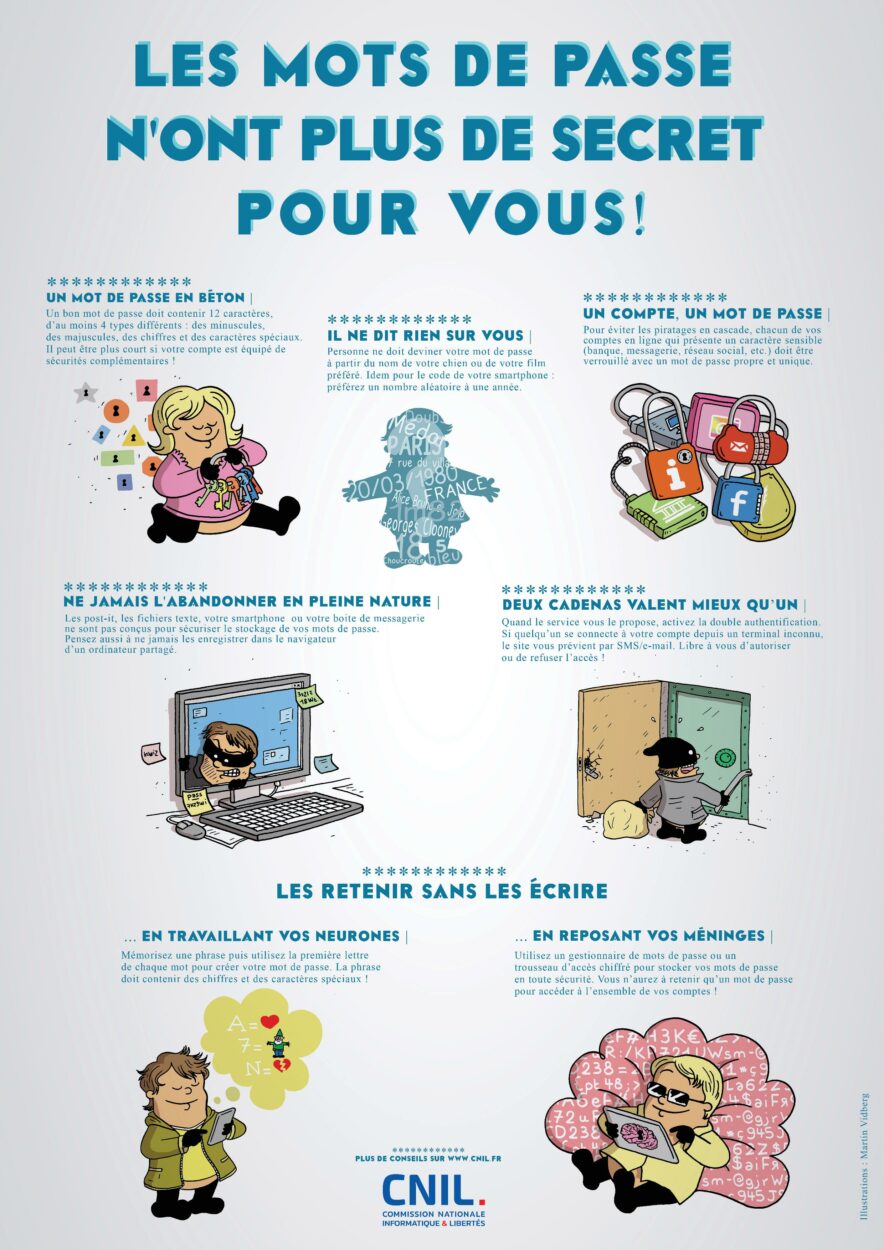
Following these rules for one or two accounts is doable, but for 50 or 200 accounts it’s impossible. The idea is to make the effort for just one password: the master password.
Many people ask me: why should a password be unique if mine is already very complex, and why shouldn’t it say anything about me?
If you’re wondering the same thing, understand that attackers sometimes target companies rather than you, and databases do leak… If your password is in one of them, all your accounts are compromised through no fault of your own.
All your other passwords will follow these rules automatically, since the password manager generates and stores them.
Two-factor authentication
Two-factor authentication confirms that you’re the account’s user through an extra factor, such as a code sent to your phone.
If an attacker tries to log in from 4,000 kilometres away, even with your password, they’ll struggle to get hold of the code sent to your phone.
So I consider it essential to enable it at the very least on your password manager. If someone ever steals your master password, two-factor authentication will stop them from getting all your passwords.
Ideally, I recommend enabling two-factor authentication on all your accounts wherever possible.
Email accounts
When you install a password manager, you usually need to create an account, which requires an email address and a master password.
That’s why it’s also recommended not to store your email account password(s) in your password manager.
If you ever lose your master password, you can reset it via your email. But if that email’s password is a complex one stored only in the manager, you’ll have no way of recovering your account or any of your passwords.
Which password manager should you choose?
This article isn’t about which password manager is better than another, but about showing how important it is to use one.
That said, to help with your search, here’s a non-exhaustive list:
- Bitwarden : open source, which inspires trust. Free for individuals and paid for businesses, with extra features of course. Supports secure notes. Available as a browser extension, desktop app and website, and can be self-hosted.
- KeePass : open source, with slightly fewer built-in features than Bitwarden, but many compatible tools to extend it. KeePass works with a range of plugins that can make it very powerful; just make sure they’re trustworthy.
- Dashlane : paid and not open source, but very pleasant to use. It had a free version, though an extremely limited one. It’s very good at autofilling forms.
- 1Password : paid, along the same lines as Dashlane. It’s extremely well integrated with macOS thanks to 1Password CLI, which takes its use even further.
Practical examples
Phishing
“Alice receives a fraudulent email leading to a site that looks like her bank’s. Her password manager refuses to fill in the fields because the URL doesn’t match the saved one. She realises it’s a phishing attempt.”
Syncing
“Marc loses his phone while travelling. Thanks to his password manager synced to his computer, he can quickly access his critical accounts and disable the stolen phone.”
Data breach
“When an e-commerce platform suffers a data breach, Paul is relieved: his manager had generated a unique password for that site, so none of his other accounts are compromised.”
Conclusion
Everyone has online accounts. There’s no escaping it: even the French government has moved services online, such as filing tax returns.
Back in the day, having your Minecraft account hacked was unpleasant, but hardly a disaster.
Now you have an account for electricity, one for gas, one for your bank, one for the post office, one for social security contributions if you’re self-employed… So many important accounts that can’t meet the CNIL’s password recommendations without a manager…
All you need to remember are two passwords, one for your password manager and one for your email account, with two-factor authentication on both.
Then you’ll be ready for the digital transition of public and private services, a process that’s only just beginning!
Note: once you’ve adopted a password manager, take the time to show your family, friends and colleagues how to use one.
Password manager FAQ
Are password managers secure?
Yes, provided you choose a reputable tool and follow best practices: a strong master password, two-factor authentication and so on.
What if I lose my master password?
Most managers offer secure recovery options. Still, it’s wise to keep your master password somewhere safe (for example, in a separate manager or on a piece of paper kept confidential).
Can I really trust an online password manager?
Open-source password managers such as Bitwarden offer full transparency, and cloud services use end-to-end encryption.
What are the risks if a password manager is compromised?
A compromised manager can expose your data. That’s why you should choose a reputable solution, enable two-factor authentication and keep an eye on data breaches.
Do I have to pay for a password manager?
No, free tools such as Bitwarden already offer plenty of features. Paid versions add advanced options (password sharing, extra secure storage).

Leave a Reply