
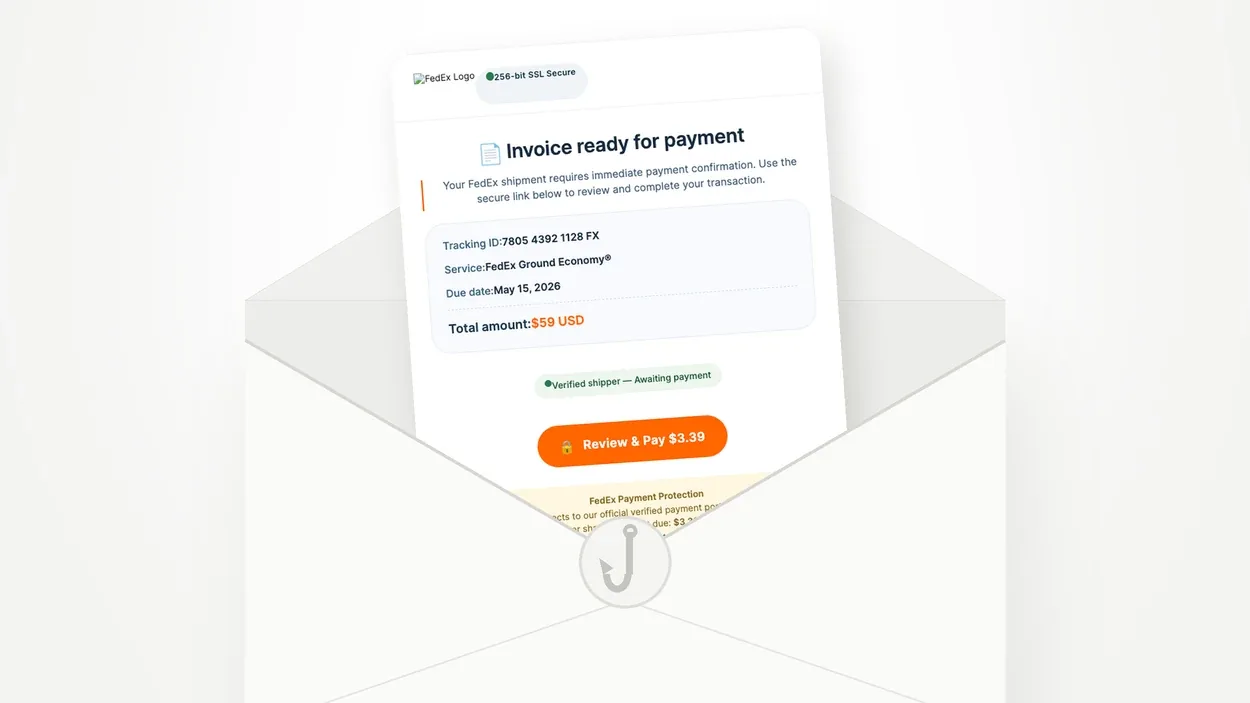
Did you receive an email from “FedEx Delivery Services” titled “Action Required to Release Package”, “Confirm Delivery Address” or “Immediate Payment Needed”, asking you to pay a small fee to release a package? It’s a scam. FedEx never asks for payment in an unsolicited email. This campaign has one notable twist: the payment button leads to a genuine PayPal page. Here’s how to spot it and what to do.
Is this FedEx email a scam?
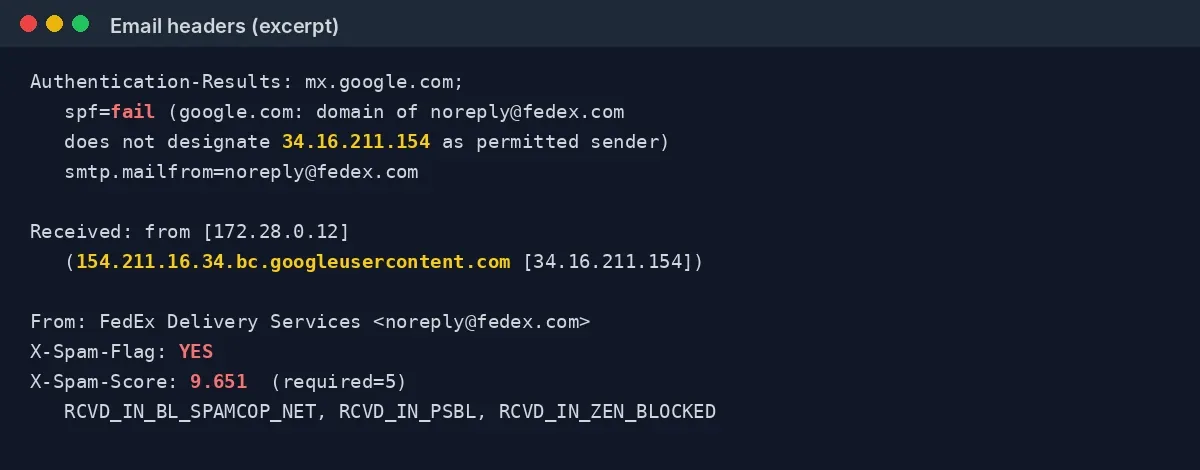
Yes. The email shows the address noreply@fedex.com (or support@fedex.com in some variants), but it wasn’t sent by FedEx. Its headers show that the sending server isn’t authorised to send email for the fedex.com domain: the SPF check fails. The message announces an “Invoice ready for payment” and invites you to click “Review & Pay $3.39”.
The basic rule: FedEx states on its fraud page that it does not send unsolicited emails or text messages asking for money or personal information in exchange for a package. If you’re not expecting a FedEx delivery, that settles it.
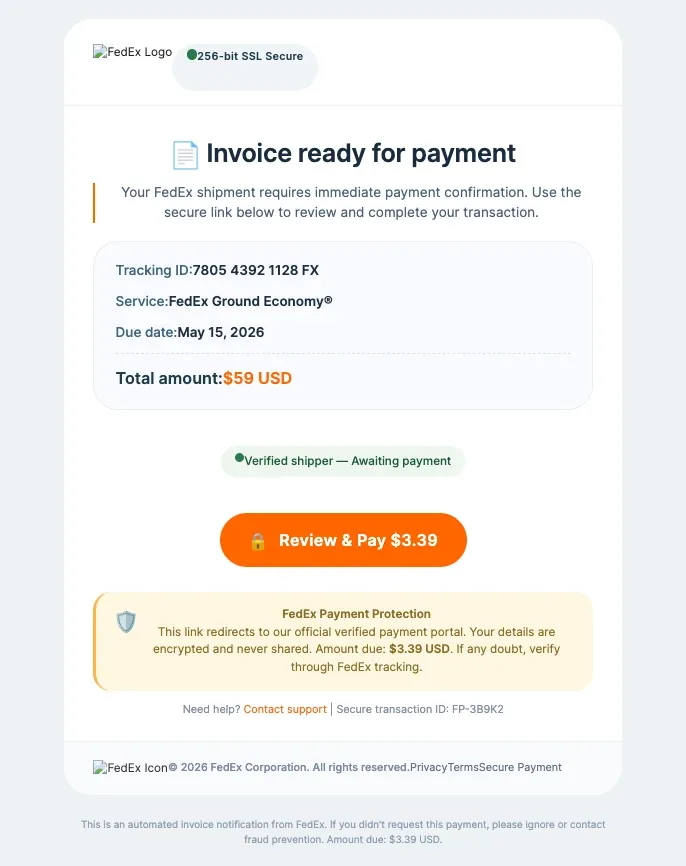
A $59 invoice, a $3.39 button: the inconsistency that gives it away
The most telling sign is the amounts. The main box states “Total amount: $59 USD“, yet the orange button asks you to pay $3.39, the figure repeated in the “FedEx Payment Protection” box and the footer. A real invoice doesn’t show two different totals.
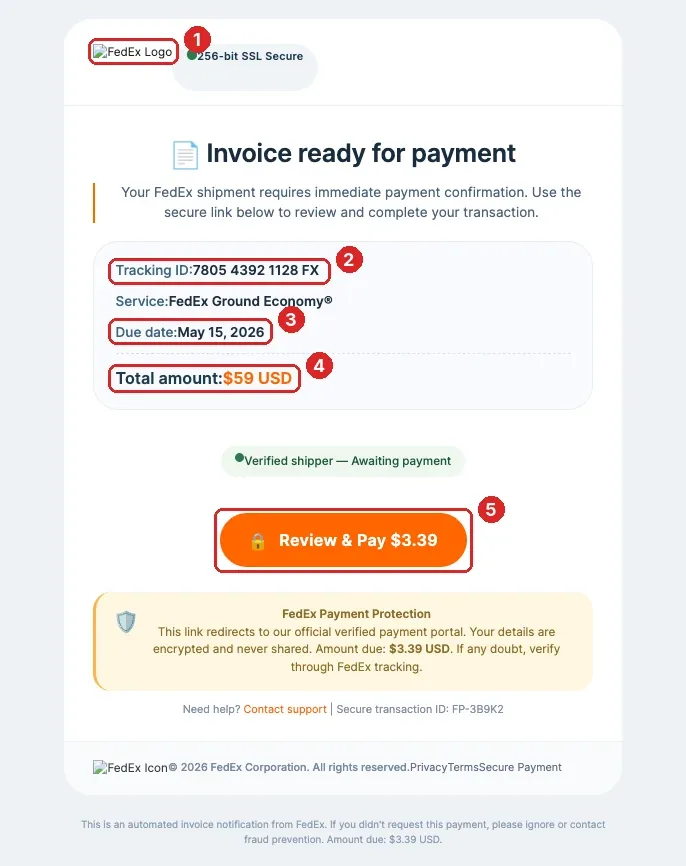
A closer look reveals more anomalies:
- The FedEx logo doesn’t load. The email displays “FedEx Logo” instead of the image, and “FedEx Icon” in the footer. A real FedEx email loads its visuals from FedEx’s own servers.
- The tracking number “7805 4392 1128 FX” is made up. FedEx tracking numbers contain digits only, with no “FX” suffix.
- The due date has passed. The email, received in October 2026, demands a payment “due” on 15 May 2026, five months earlier.
- Two amounts coexist. $59 announced, $3.39 requested.
- The button doesn’t lead to FedEx. It points to paypal.com, like every other link in the email, including “Contact support”, “Privacy” and “Terms”.
The message also relies on reassuring badges (“256-bit SSL Secure”, “Verified shipper”, “FedEx Payment Protection”) that prove nothing: anyone can type those words into an email.
Three emails, three subjects, one message
We received three copies of this campaign on the same day, a few hours apart, at the contact address of one of our websites. The subjects change (“Action Required to Release Package”, “Confirm Delivery Address”, “Immediate Payment Needed”), as does the reference in brackets, but the content is identical: same tracking number, same “FP-3B9K2” transaction ID, same amount.

The “Confirm Delivery Address” subject doesn’t even match the content, which is about an invoice, not an address. Rotating subjects helps scammers slip past spam filters that flag identical bulk mailings, and lets them test which wording gets the most clicks.
Why the PayPal link makes this scam so effective
Unlike classic scams that lead to a fake website, every link in this email points to an address like paypal.com/ncp/payment/…. It’s a genuine PayPal link, generated by the “no-code checkout” feature PayPal offers merchants who want to accept payments without building an online shop.
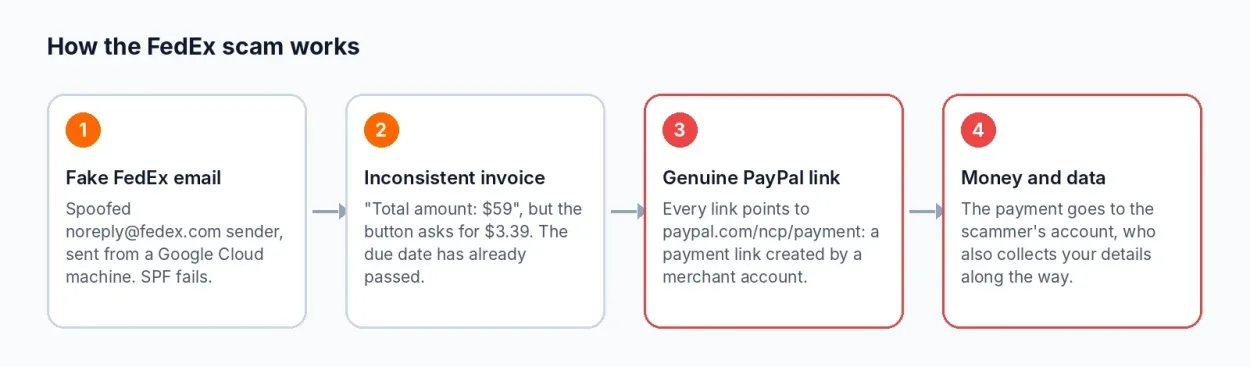
This approach gives scammers several advantages:
- The link gets past filters. A domain like paypal.com isn’t blocked by security tools, unlike a freshly registered domain name.
- The victim feels reassured. Hovering over the button shows paypal.com, and the page that opens really is hosted by PayPal, padlock included.
- The money goes straight to the scammers. A PayPal payment link is created by a merchant account: by paying, you send money to that account, not to FedEx.
The small $3.39 amount is no accident. It seems harmless, which encourages people to pay without thinking, and above all it lets scammers check that a card or PayPal account is active. Once confirmed, the details can be resold or reused for larger charges. Security company Malwarebytes documented the abuse of these no-code checkout links back in 2025, in a campaign of fake Google ads.
We didn’t click the payment link: it adds nothing to the analysis and could tell the scammers the address is active. Reading the destination address is enough to reach a conclusion.
What the email headers reveal
The displayed sender address can be faked in seconds. The technical headers tell a different story. In Gmail, you can view them via the three dots at the top right of the message, then “Show original”.

They show that:
- SPF fails. The fedex.com domain doesn’t authorise the IP address 34.16.211.154 to send email on its behalf. In other words, the noreply@fedex.com address is spoofed.
- The email comes from a Google Cloud machine. The IP address resolves to 154.211.16.34.bc.googleusercontent.com, typical of a virtual server rented on Google Cloud, not FedEx infrastructure.
- The receiving server’s spam filter scored it heavily. A score of 9.65 against a threshold of 5, with listings on several blocklists (SpamCop, PSBL, Spamhaus ZEN).
How to check whether a FedEx package is really waiting for you
Never click links in an unexpected delivery email. If you really are expecting a package, go to fedex.com by typing the address yourself, then enter the tracking number provided by the seller, never the one in the suspicious email.
Customs or clearance fees do exist for some international shipments, but they relate to a package you actually ordered, with a tracking number you can find in your order confirmation. An email demanding money for a package you know nothing about should be treated as suspicious by default.
What to do if you paid
If you paid the $3.39 via PayPal, open a dispute from your PayPal account (Resolution Center) and report an unauthorised or fraudulent transaction. Change your PayPal password and turn on two-factor authentication if you haven’t already.
If you paid by card, call your bank to block it and keep an eye on your statements: a small test payment is often followed by larger charges. Fraudulent payments can usually be disputed, provided you report them quickly.
In all cases, report the email to FedEx by forwarding it to abuse@fedex.com, and report it to your national anti-fraud service.
Another scam hijacking a trusted brand
This campaign follows the same playbook as the other scams documented on safecode.fr, from the fake €195 tax refund to the fake cloud storage warning: a well-known brand, an urgent pretext and a small amount. What’s new is the use of a legitimate payment service, which makes the link look credible at first glance. Remember one simple rule: a link pointing to a reputable website doesn’t mean the person sending it is honest. To spot the warning signs on your own machine, see our guide on how to tell if your computer has been hacked.
FedEx email scam: frequently asked questions
FedEx doesn’t send unsolicited emails demanding payment in exchange for a package. Check that every link leads to fedex.com, be wary of inconsistent amounts and tracking numbers containing letters, and track your package directly on fedex.com by typing the address yourself.
No. The PayPal link is genuine, but it was created by a merchant account belonging to the scammers. Paying means sending them money. A legitimate website doesn’t make the email’s sender legitimate.
Open a dispute in your PayPal account and report a fraudulent transaction, change your password and turn on two-factor authentication. If you paid by card, block it with your bank and monitor your statements.
Forward it to abuse@fedex.com and report it to your national anti-fraud or cybercrime reporting service.

Leave a Reply